 WinAppMigrator
This page takes you from the download to the app's first screen.
- Windows 10 or Windows 11, 64-bit. The app is an x64 program. Windows 11 on Arm runs it through emulation. Windows 10 on Arm cannot run x64 programs, and 32-bit Windows cannot run it at all. Desktop Windows 10 and 11 on x64 have not been run in the project's tests, which use Windows Server 2022 and 2025 and Windows 11 on Arm. See Requirements and testing.
- Administrator rights on the PC. The app always asks for them when it starts. See Administrator rights.
- Direct3D 12, which Windows uses to draw the app's window. Windows 10 and 11 normally have it. An old graphics driver or a virtual machine may not. See Direct3D 12.
- Room on a drive for the installer you build. The app tells you how much before you start.
- Internet on the old PC is optional. If it is there when you build, the app downloads the Microsoft runtimes it can include and puts them inside the installer. See Runtimes.
More detail, and what has and has not been tested, is in Requirements and testing.
Go to the latest release. It has three files:
| File | What it is | Take it if |
|---|---|---|
WinAppMigrator-v0.6.0.exe |
The app itself. One file, with nothing to install. | You just want to use it. This is the one most people want. |
WinAppMigrator-v0.6.0-windows-x64.zip |
The same app, as winappmigrator.exe, with the README, the changelog, the license, and the third-party licenses |
You want the paperwork as well |
SHA256SUMS.txt |
The checksums of the two files above | You want to check your download |
The installer part that goes inside every installer, the installer stub, is never published on its own. It is already inside the app.
This is optional, and worth doing. Each check below is independent. Run them in PowerShell, in the folder you saved the file to.
1. The checksum. A hash is a fingerprint of a file. If even one byte changes, it changes.
Get-FileHash .\WinAppMigrator-v0.6.0.exe -Algorithm SHA256
Get-Content .\SHA256SUMS.txt
The long number from Get-FileHash should match the one on the line for that file. Get-FileHash prints capital letters and the file uses small ones. That is fine: compare the letters and digits.
2. The signature. A signature says who made the file, and that it has not changed since.
$signature = Get-AuthenticodeSignature .\WinAppMigrator-v0.6.0.exe
$signature.Status                     # should say Valid
$signature.SignerCertificate.Subject  # should include CN=Randy Northrup
You can also right-click the file, choose Properties, and look at the Digital Signatures tab. Version 0.5.0 is the first release whose app is signed. Downloads from earlier releases are not signed.
3. Where it was built. Each release from 0.5.0 on records that GitHub's own release workflow built it, from this repository. This record is called an attestation. If you have the GitHub CLI, run:
gh attestation verify .\WinAppMigrator-v0.6.0.exe --repo RandyNorthrup/WinAppMigratorThe same works for the zip.
-
Double-click
WinAppMigrator-v0.6.0.exe. There is nothing to install. It runs from wherever you saved it. - SmartScreen. Windows SmartScreen may show a "Windows protected your PC" screen for a file it has not seen often. If it does, choose More info and check that the publisher is Randy Northrup before you choose Run anyway.
- The administrator prompt. Windows asks whether to let the app make changes. This is the UAC prompt. The app always asks, because reading another PC's drive, and files that only administrators may read, need administrator rights. For the signed download, the prompt names Randy Northrup as the verified publisher. If it says "Unknown publisher" for this file, it is not the signed release file, so do not run it.
- The window opens. If instead you see a message that the window could not open and that it needs Direct3D 12, see Troubleshooting. The app has no way to run without its window.
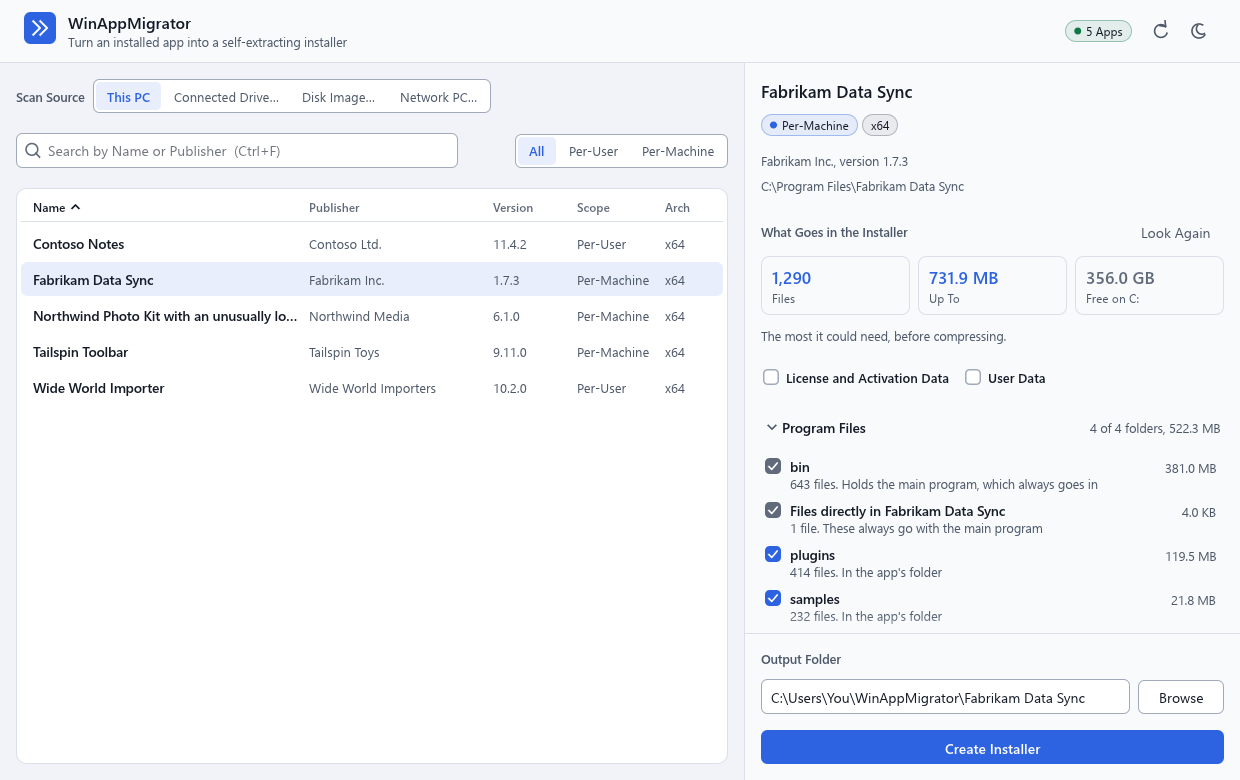
- The list of installed apps is on the left. While it loads, the small label at the top right says Loading, and then how many apps it found, such as 5 apps.
- The window starts in light or dark mode, whichever Windows is in. The sun or moon button at the top right switches it, and the app remembers your choice. See Files it keeps on a PC.
- Click an app. The right side shows what would go into its installer, and starts working that out at once. Nothing is built until you click Create Installer.
Next: Building an installer.
Last changed 2026-11-11. Describes WinAppMigrator as of its latest release, 0.6.0.