 WinAppMigrator
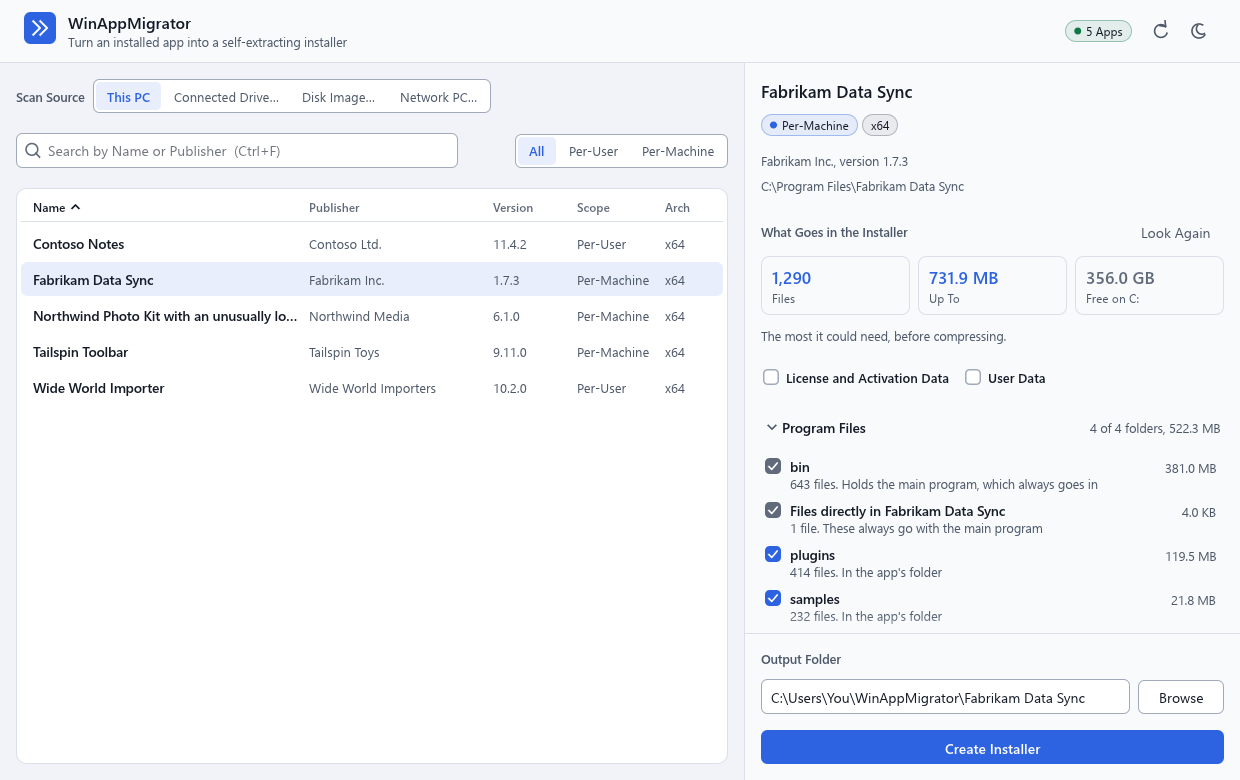
WinAppMigrator turns an app that is installed on one Windows PC into a single installer you can run on another PC. It works backward from what is already on the PC: the app's files, its settings, its background services, and the extra Microsoft pieces it needs to run. So it can help when the original setup file is lost, the company that made the app is gone, or the old PC will not even start.
- Anyone moving to a new PC who wants an app to come along without hunting for its setup file.
- Anyone rescuing an app from a dying PC. You can take the drive out, connect it to a working PC, and build an installer from the app on that drive. If the drive may be failing, make an image of it first and build from the image, since reading a failing drive can finish it off. A real disk from another PC has not been run in the project's tests. See Moving from a connected drive or a disk image.
- Anyone leaving Windows 7, Vista, 8, or 8.1. An app on such a PC's drive, or on an image of it, can be built into an installer for Windows 10 or 11. The app itself runs on Windows 10 or 11. See Apps from Windows 7, Vista, 8, or 8.1.
- Anyone whose old PC still runs, on the same network. Nothing has to be taken out of it. A small program, WinAppMigrator Client, runs on the old PC, Windows 7 or later, and the app reads that PC over your network. See Moving from a PC over the network.
- People who look after several PCs and want to install the same app by script. See Command line.
These pages are also on the website, where search engines can find them.
You do not need to know how Windows works inside. The app shows you, in plain words, what it found and what it will do, before it does anything.
It is only for software you are allowed to move. It does not get around licenses or activation. See Privacy and security.
| Piece | Where it runs | What it does |
|---|---|---|
The app, winappmigrator.exe
|
The old PC, or any PC with the old PC's drive connected, or an image of it, or the old PC over the network | Lists the installed apps, shows what would go into an installer for the one you pick, and builds that installer. It never installs anything itself. |
The installer it builds, such as Fabrikam_Data_Sync_installer.exe
|
The new PC | Shows what it will set up, installs the app, checks every file it wrote, puts back what it changed if something goes wrong, except runtimes, and says if anything could not be, and leaves an uninstaller in Settings. |
WinAppMigrator Client, WinAppMigrator Client.exe
|
The old PC, Windows 7 or later, only while the app reads it over the network | Lets the app on another PC read this one, and nothing more. It builds nothing and installs nothing. The app carries it, and saves it for you. See Moving from a PC over the network. |
Each installer is one self-extracting installer file. A very big app comes as two files that must stay together. See Big apps.
- Getting started: download it, check it, and open it.
- How it works: the whole journey on one page, with a picture.
- Building an installer: the app's screen, control by control.
- Installing on the new PC: the installer's screen, step by step.
- Undoing an install: how to take it back out.
Before you rely on it, especially for a one-way move off a failing PC, read Limitations and Privacy and security. If something goes wrong, see Troubleshooting. Words you do not know are in the Glossary.
This wiki describes WinAppMigrator 0.6.0. Three things in it are new in 0.6.0, and 0.5.0 does not have them:
- reading a disk image of another PC's drive, a
.vhdor.vhdx, with Disk Image…; - moving apps from Windows 7, Vista, 8, or 8.1 to Windows 10 or 11;
- reading another PC over the network, Windows 7 or later, with Network PC… and WinAppMigrator Client.
0.5.0 was the first release whose app is signed, and 0.6.0 is the first whose WinAppMigrator Client is.
The documents in the repository are the authority. This wiki explains them in plainer words and links to them for detail:
| Document | What it covers |
|---|---|
| README | What it does, what it captures, what it has been tried on, and its limits |
| SECURITY.md | The trust model, what an installer can hold, and how to report a problem |
| docs/discovery.md | How an app's files and settings are found |
| docs/gui.md | How the screens are built |
| docs/signing.md | What is signed, what must never be, and how |
| CONTRIBUTING.md | The project's rules and checks |
| CHANGELOG.md | What changed in each release |
If this wiki and those documents ever disagree, go by the documents, and please say so in an issue.
Last changed 2026-11-11. Describes WinAppMigrator as of its latest release, 0.6.0.